
Use min server memory (MB) and max server memory (MB) to reconfigure the amount of memory (in megabytes) managed by the SQL Server Memory Manager for an instance of SQL Server.
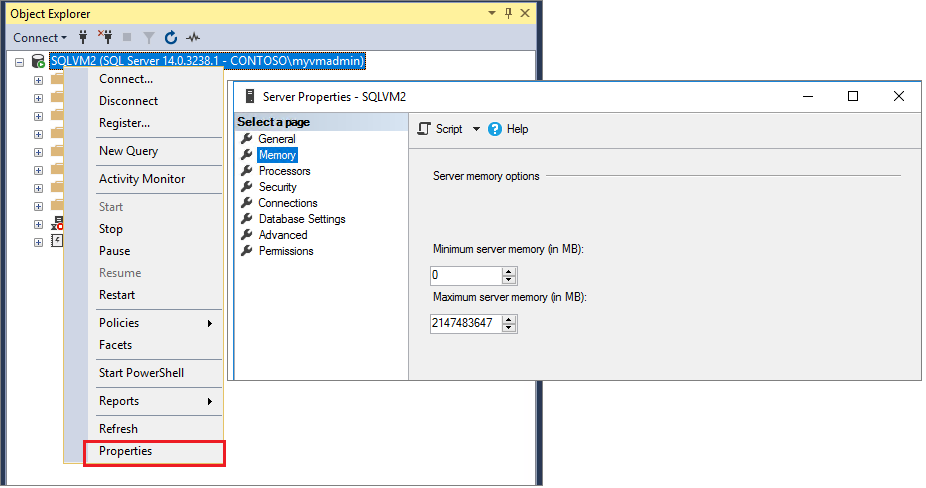
- In Object Explorer, right-click a server and select Properties.
- Select the Memory page of the Server Properties window. The current values of Minimum server memory and Maximum server memory are displayed.
- In Server memory options, enter desired numbers for Minimum server memory and Maximum server memory. For recommendations, see Min Server Memory (https://learn.microsoft.com/en-us/sql/database-engine/configure-windows/server-memory-server-configuration-options?view=sql-server-ver17#min-server-memory) and see Max Server Memory (https://learn.microsoft.com/en-us/sql/database-engine/configure-windows/server-memory-server-configuration-options?view=sql-server-ver17#max-server-memory) in this article.
The following screenshot demonstrates all three steps:
Lock pages in memory (LPIM)
Windows-based applications can use Windows Address Windowing Extensions (AWE) APIs to allocate and map physical memory into the process address space. The LPIM Windows policy determines which accounts can access the API to keep data in physical memory, preventing the system from paging the data to virtual memory on disk. The memory allocated using AWE is locked until the application explicitly frees it or exits. Using the AWE APIs for memory management in 64-bit SQL Server is also frequently referred to as locked pages. Locking pages in memory might keep the server responsive when paging memory to disk occurs. The Lock pages in memory option is enabled in instances of SQL Server Standard edition and higher when the account with privileges to run sqlservr.exe has been granted the Windows Lock pages in memory (LPIM) user right.
To disable the Lock pages in memory option for SQL Server, remove the Lock pages in memory user right for the account with privileges to run sqlservr.exe (the SQL Server startup account) startup account.
Using LPIM doesn't affect SQL Server dynamic memory management, allowing it to expand or shrink at the request of other memory clerks. When using the Lock pages in memory user right, it's strongly recommended to set an upper limit for max server memory (MB).
LPIM should be used when there are signs that the sqlservr process is being paged out. In this case, error 17890 will be reported in the Errorlog,
Comments
Article is closed for comments.